


Rhythm Rush - Piano Music Game
4.4860.00 Reviews
App Specs
- Version
- 1.9.23
- Updated On
- License
- Free
- Downloads
- 10,000,000+
- Developer
- Boom Studio Limited
- Categories
- Music
- Platform
- Android, iOS
Screenshots
 Analysis by AppCompare
I judge a rhythm game by more than whether its songs sound good: the early goals need to make sense, progress should feel earned, and a harder section should challenge my timing without turning every session into a string of frustrating retries. Rhythm Rush - Piano Music Game is built around tapping along with music, so it is easy to understand at a glance. The more useful question is whether that simple idea gives you a reason to keep playing—and whether it fits the way you like to enjoy music games.
Finding a Rhythm That Keeps You Playing
I look at a rhythm game’s early goals as a small promise: give me something clear to try, then let me decide whether improving feels rewarding rather than obligatory. Here, I’ll focus on how a simple tap-along premise can make that first step approachable, and on the kind of progress that comes from listening more closely. That sets up the bigger question of how challenge and reasons to return shape the experience.
Simple first steps, with a clear purpose
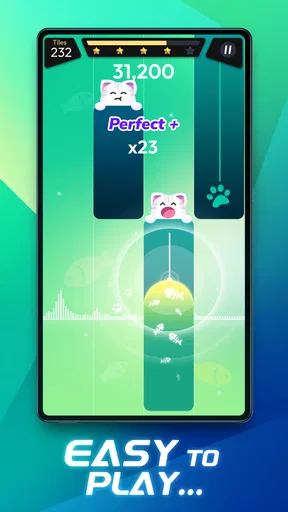
The basic appeal is immediate: follow the music and tap in time. That makes Rhythm Rush approachable if you have never tried a piano-tile-style game, and it gives experienced players a familiar starting point. I would treat the opening sessions as a chance to settle into the timing rather than rush toward a high score. A steady first run can tell you more about whether the game feels comfortable on your device than a handful of frantic attempts.
The game is free to download, and it is a music game from Boom Studio Limited. Its Everyone age rating makes it broadly suitable for casual play, though the quick reactions involved may suit some players more than others. The game has a 4.6 average from around 26,000 ratings, and more than 10 million installs. Those figures suggest a substantial audience, but popularity alone does not tell me whether its play style will click for you; the key is whether tapping along feels satisfying rather than like busywork.
What progress feels like from one attempt to the next
In a rhythm game, progress is often less about a long checklist and more about noticing that a passage which once made you hesitate now feels manageable. Rhythm Rush’s straightforward tap-to-the-beat premise gives you a practical way to measure that: replay a section and pay attention to whether you can stay focused on the music instead of anticipating every tap with tension. That small change in confidence can be more rewarding than chasing a score without understanding what improved.
For a useful practice routine, choose a song or section that feels just beyond comfortable, then give it a few focused attempts. If your timing slips in the same place, slow down mentally and listen for the musical cue rather than tapping harder or faster. This is a general technique for rhythm play, not a special setting, but it makes short sessions feel purposeful. If you are only playing to pass time, you can instead dip in for a run and stop when the game stops feeling fun.
Challenge and pacing: where the appeal can change
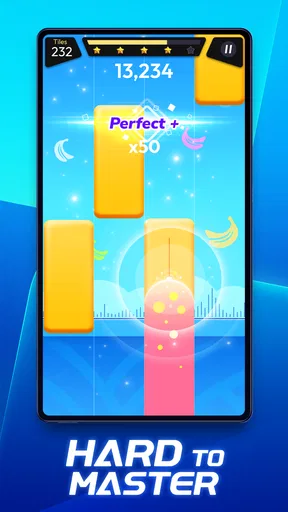
Rhythm games tend to become more demanding as patterns speed up or ask for greater precision. That escalation is part of the fun for players who enjoy improving their reactions, but it can also be the point where a casual music break starts to feel like practice. I like a challenge when it makes me listen more closely; I am less keen when I find myself repeating an awkward passage without feeling that I understand it better. If a run begins to feel frustrating, stepping away and returning later is a better use of your time than forcing one more attempt.
Worth Reading Before You Choose

EA SPORTS FC Mobile 26 Is a Bigger Football Game, but It Takes Time

Flipboard Shows What News Apps Must Do Beyond the Feed

Switching to Android Auto Means Rethinking Your Driving Routine

Google Calendar Makes a Crowded Week Easier to Manage

Ludo King Makes the Most of the Minutes Between Plans

Baby Panda World Brings Quick Play to Modern Phones, but Its Game Library Feels Busy
The tap-based format also has a physical trade-off: the screen becomes your instrument, so comfort and accuracy matter. A device that is awkward to hold, or a playing position that makes your fingers tense, can make a song feel harder than it really is. I would try a relaxed grip and keep the screen steady before deciding that a difficult run is beyond your skill. That is especially useful when playing in a short break, where a cramped hand can end the session sooner than the game itself.
Reasons to return, and when to take a break
Daily challenges and rewards can give regular players a small reason to come back, while multiplayer competition offers a different kind of motivation: testing your performance against another person rather than only against your own previous attempts. These are appealing hooks if you like routine or friendly rivalry. They are less important if you prefer to play at your own pace, and neither should be the reason you keep going when the music or challenge is no longer enjoyable.
There is also a spending consideration. The game is free, but it includes optional in-app purchases ranging from $0.49 to $75.88 per item. I would start by playing without buying anything and decide whether the core rhythm experience is enough for you. If you are setting up the game for a younger player, it is sensible to review purchase controls on the device as well; an Everyone age rating describes the content rating, not your preferred household spending rules.
Who will enjoy it—and who may prefer another kind of game
I can see this working well for someone who wants a music-themed game that is quick to understand and easy to fit into a spare moment. It may also suit players who enjoy improving at a narrow skill: listening, reacting, and keeping a steady rhythm. For example, on a short commute or while waiting for a friend, you could play a brief session, focus on one tricky passage, and put the game away without needing to commit to a long story or a complicated setup.
If you want to learn piano technique, though, a tapping game is not a substitute for lessons or an instrument. It can train attention to timing in a playful way, but it does not make the screen behave like piano keys in a way that teaches fingering or musical theory. Likewise, if you prefer relaxed games with little pressure, or want a music app that simply plays songs while you listen, this is not the right fit. A playlist app serves passive listening better; a slower puzzle or simulation may be a better choice when you want to unwind without reacting to a beat.
How it sits beside familiar rhythm games
The obvious alternative is another piano-tile-style game, and the core interaction will feel familiar to anyone who has tried one: watch the play area, follow the rhythm, and tap accurately. Rhythm Rush’s appeal depends on whether its song selection, challenge, and available play modes suit your taste, rather than on the basic control scheme being entirely new. If you are comparing options, I would pay attention to the music you actually want to replay and whether the difficulty feels motivating over several sessions. A more elaborate music game may be preferable if you want deeper controls or a different kind of performance; a simpler title may suit you better if you only want occasional taps without competitive pressure.
One practical tip is to decide what you want from a session before opening the game: a quick diversion, a focused attempt at improving, or a bit of competition. That helps keep rewards and challenges in their proper place. Another is to notice whether you are listening to the song or staring so intensely at the tiles that the music becomes background noise. The game is at its best for me when the visual taps and the sound reinforce each other. If they start to feel disconnected, a shorter session can be more enjoyable than grinding through retries.
A sensible way to try it
The current version is 1.9.23, and the minimum operating system requirement is Android 6.0. Before installing, check that your device meets that Android requirement if you are using Android; on any device, leave yourself enough attention for a game that asks for timely taps. I would also decide in advance whether you are comfortable with optional purchases, especially if the game will be shared. Since it is free to start, you can first see whether the controls, song choices, and level of challenge suit you before spending.
One question people often have is whether they need rhythm-game experience. I do not think so: the central action is easy to grasp, and a newcomer can begin by concentrating on keeping time. The more relevant question is whether they enjoy improving through repetition. Another is whether it is a good fit for a quick break. It can be, provided you are comfortable with a fast, attention-demanding activity rather than a passive way to relax. And if competition does not appeal, the game’s music-driven tapping remains the main draw; you do not have to treat every session as a contest to get something out of it.
My take on its staying power
Rhythm Rush has the ingredients that can sustain repeat play: an easy-to-grasp goal, a reason to refine your timing, and challenges or multiplayer play for people who want extra motivation. Its staying power will depend on your appetite for tapping games and how much you enjoy revisiting music to improve. I would not recommend it as a music-learning tool or as a calm, hands-off listening experience, but as a free rhythm game for short, focused sessions, it is an approachable option to try.
What I appreciate most is that the basic idea does not require a long explanation. You can get a feel for the play style quickly, then decide whether the challenge keeps you engaged. If you enjoy music games and do not mind retrying a difficult passage, it is worth giving Rhythm Rush a fair try. If you would rather listen than react, or you dislike pressure around timing, you will probably be happier with a different kind of music app.
So, I recently got my hands on Rhythm Rush - Piano Music Game, and let me tell you, it's a wild ride for anyone who loves music and gaming. If you're the kind of person who taps your foot to every beat you hear, this app might just become your new obsession. Trust me, once you start, you'll find it hard to put down.
Getting Into the Groove
First things first, downloading and installing Rhythm Rush - Piano Music Game was a breeze. Available on both Android and iOS, it’s super accessible. As soon as you open the app, you’re greeted with a slick interface that just screams "let's have some fun!" The design is intuitive, and even if you’ve never played a rhythm game before, you’ll get the hang of it in no time.
Piano Tiles with a Twist
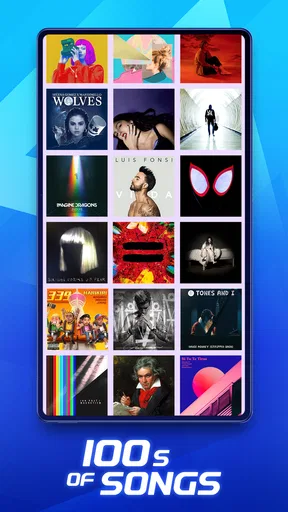
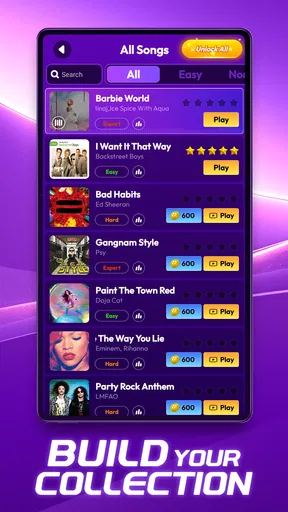
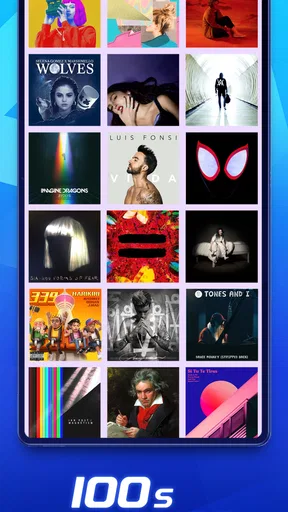
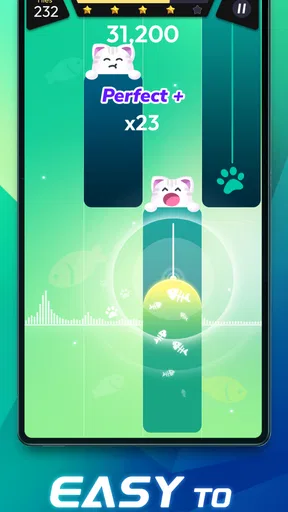
Now, you might be thinking, "Is this just another piano tiles game?" Well, yes and no. Sure, you’ve got the classic setup where you tap on tiles to the rhythm of the music, but Rhythm Rush brings a fresh twist with its diverse music library and engaging gameplay modes. From classical tunes to pop hits, there's something for everyone. And the best part? The music library is constantly updating, so you’re always in for a surprise.
Features That Hit the Right Note
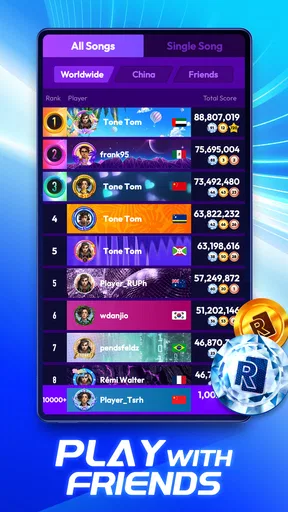
What really sets this app apart are the additional features. For starters, there’s a multiplayer mode where you can challenge your friends or even random players worldwide. It's a great way to test your skills and see where you stand on the global leaderboard. Plus, there are daily challenges and rewards that keep you coming back for more. Who doesn’t love a little competition?
Another cool feature is the customization options. You can personalize your game with unique themes and avatars. It’s a small touch, but it really adds to the overall experience and makes the game feel like it's truly yours.
Mastering the Rhythm
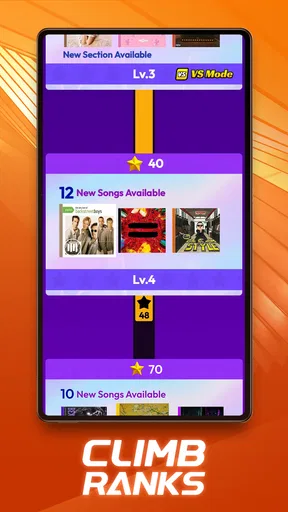
As with any rhythm game, things start off easy, but soon you’ll find yourself in the middle of a fast-paced frenzy. The difficulty ramps up nicely, ensuring that you’re always challenged but never overwhelmed. And hey, even if you mess up a few times, it’s all part of the fun. There’s a real sense of achievement when you finally nail that tricky section you’ve been struggling with.
Community Vibes
I have to say, the community aspect of Rhythm Rush is lively and welcoming. There’s an active forum where players share tips, tricks, and even their own compositions. It’s a fantastic platform for anyone who wants to dive deeper into the world of rhythm games. Plus, the developers are pretty responsive, often engaging with players and taking feedback seriously. It’s always nice to see that they care about their community.
Final Thoughts
Overall, Rhythm Rush - Piano Music Game is a refreshing take on the rhythm genre. Whether you're a seasoned player or a newbie, there's something here for everyone. The combination of an engaging gameplay experience, a vast music library, and a robust community makes it a must-try. So, if you’re looking for a game that’s fun, challenging, and a bit addictive, go ahead and give it a whirl. Just be warned—once you start, you might not want to stop!
Ready to hit the right notes? Check it out on your app store today and let the music take over!
Pros
- Intuitive controls for easy gameplay.
- Wide range of popular songs available.
- Stunning visual effects enhance experience.
- Regular updates with new content.
- Offline mode for on-the-go play.
Cons
- In-app purchases can be pricey.
- Ads may disrupt gameplay experience.
- Limited song selection without premium.
- Occasional lag on older devices.
- Requires significant storage space.
FAQs for Rhythm Rush - Piano Music Game
What is Rhythm Rush - Piano Music Game?
Rhythm Rush - Piano Music Game is an engaging mobile game that combines the thrill of rhythm-based gameplay with the elegance of piano music. Players tap along to various tracks, enhancing their timing and reflexes. The game offers a wide range of songs and difficulty levels, making it suitable for both beginners and experienced players.
Is Rhythm Rush free to play?
Yes, Rhythm Rush is free to download and play. However, it does contain in-app purchases. These purchases can enhance the gaming experience by unlocking additional songs, removing ads, or providing other premium features. Players can enjoy the core gameplay without spending money, but purchases can enrich the experience.
How does the difficulty level work in Rhythm Rush?
Rhythm Rush offers multiple difficulty levels to cater to different player skills. Beginners can start with easy levels to get a grasp of the gameplay mechanics, while more experienced players can challenge themselves with harder levels. The game adjusts the speed and complexity of notes to match the selected difficulty, ensuring a tailored experience.
Can I play Rhythm Rush offline?
Yes, Rhythm Rush can be played offline. While an internet connection is required for downloading the game and accessing certain features like new songs or updates, the core gameplay can be enjoyed without an internet connection. This makes it perfect for playing on-the-go or in areas with limited connectivity.
What kind of music is featured in Rhythm Rush?
Rhythm Rush features a diverse range of piano music, from classical pieces to modern pop hits. The game regularly updates its song library, ensuring a fresh experience with new tracks. This variety allows players to enjoy different musical genres and styles, catering to diverse musical tastes.


